


M8 Cables
M8 connection cables for power and communications with ICON | connection tools.
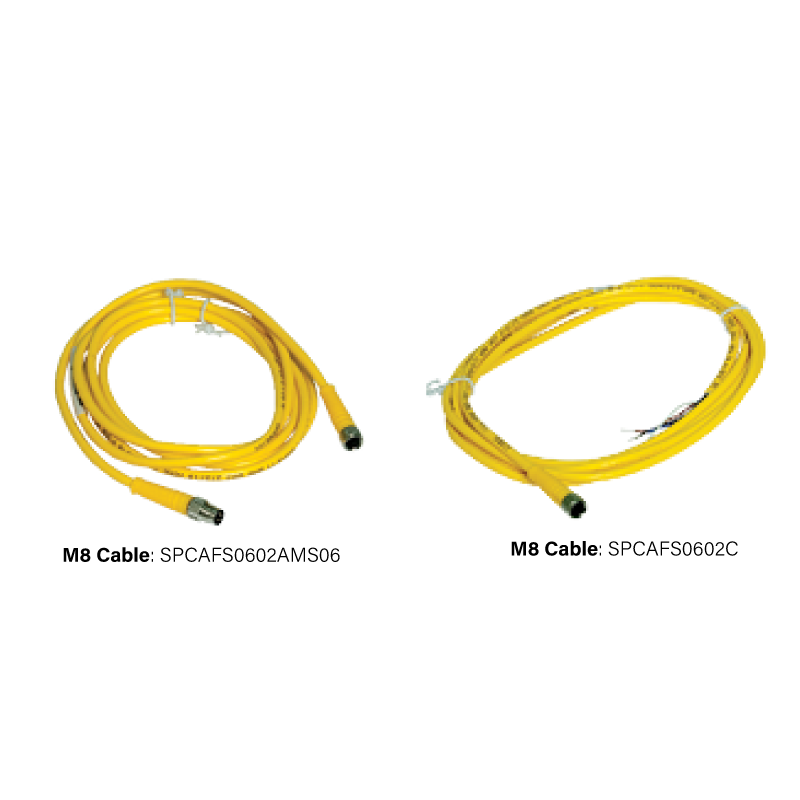
M8 Cable: SPCAFS0602AMS06
- Straight female M8 threaded connector to straight male M8 connector (6-wire 2m cable)
M8 Cable: SPCAFS0602C
- Straight female M8 to flying leads (6-wire 2m cable)
Learn More: Click Here
How to Calibrate FE ICON - SSR Dual Point Calibration: Watch Here
How to Calibrate FI ICON - SSR Dual Point Calibration: Watch Here
How to Calibrate FE ICON - SSR Dual Point Calibration: Watch Here
How to Calibrate FI ICON - SSR Dual Point Calibration: Watch Here
Similar Products
FE External Sealing Connection Tool
Pneumatic seal-only connector for fast leak-tight external connections to tubes and threads in automated and semi-automated test processes.
FI Internal Sealing Connection Tool
Pneumatic seal-only connector for fast leak-tight internal connections to tubes bores and threads in automated and semi-automated processes.
FasMate® FN Internal High-Pressure Connection Tool
Threaded-collet grip-and-seal tool for secure internal connections to threaded bores up to 5000 psi.
EZ Connect™ | ZGN Internal Wide-Tolerance Connection Tool
Manual grip-and-seal connector that fits multiple internal thread sizes and thread types with one tool.
FIG Internal Grip & Seal Connection Tool
Pneumatic internal connector with gripping collets for leak-tight connections to cast rough and irregular surfaces.
FEG External Cradle Connection Tool
Pneumatic external sealing tool with a custom cradle for flanged ports turbo housings and irregular profiles.
60 External Thread Connection Tool
Sleeve-actuated grip-and-seal tool for quick repeatable connections to standard and custom external threads.
70 External Tube Feature Connection Tool
Custom sleeve-actuated grip-and-seal tool for formed tube features and other specialized external profiles.
ME Medical External Sealing Connection Tool
Pneumatic seal-only connector for external sealing of medical and life science devices in automated and semi-automated processes.
FasMate® FX External High-Pressure Connection Tool
Collet-based grip-and-seal connector for threaded and custom external applications up to 5000 psi.
ICON | Programming Tool
Programming and setup tool for ICON | intelligent connection tools.
M8 Cables for FasTest ICON™ Connection Tools
FasTest M8 cables are the cable assemblies that connect an ICON™-equipped sealing connection tool to your control system. ICON™ tools generate seal-verification data and LED feedback, and the M8 cable is the physical link that carries that signal from the tool to a PLC, controller, or power supply — so the cable is what turns ICON™ from a light on a tool into a verified-seal handshake your test sequence can act on.
Two configurations are available, and the choice depends entirely on how your station is wired. The SPCAFS0602AMS06 is a straight female M8 threaded connector to a straight male M8 connector, for mating directly into an existing M8 receptacle. The SPCAFS0602C is a straight female M8 to flying leads, for wiring directly into a terminal block or control panel where there is no M8 receptacle to plug into. Both are 6-wire, 2 m assemblies.
Because M8 is a widely used industrial connector format, an ICON™ tool drops into standard automation infrastructure rather than requiring proprietary wiring. FasTest specifies these particular assemblies for use with its ICON™ tools, so ordering by part number is the reliable way to get a cable matched to the tool.
M8 cables are used across the ICON™-equipped FasTest range — including the FE, FI, FasMate® FN, FasMate® FX, FIG, FEG, EZ Connect™ ZGN, Series 60, Series 70, and ME. If you are setting up or recalibrating an ICON™ tool, the SSR dual-point calibration videos linked on this page walk through the procedure.
The Role of the M8 Cable in an ICON™ Installation
The cable is a small part of an ICON™ installation, but it is the part that determines whether the seal-verification signal actually reaches the control system:
- It carries the verification signal: ICON™ provides SURE SEAL™ verification, LED feedback, and safety interlock signals. None of that reaches the PLC without the cable, so the cable is what makes ICON™ usable in an automated sequence rather than just a visual indicator at the tool.
- Termination has to match the station: A station with an existing M8 receptacle needs the connector-to-connector cable; a station being wired directly into a terminal block needs flying leads. Ordering the wrong termination means either an adapter or a rework of the panel.
- M8 is standard, so it integrates cleanly: M8 is a common industrial connector format, which means an ICON™ tool connects using the same conventions as the rest of the automation on the line rather than requiring bespoke wiring.
- Length drives layout: Both standard assemblies are 2 m. Station layout — how far the tool sits from the panel or receptacle — determines whether that length works or whether a different run is needed.
Selecting the right M8 cable is therefore a two-question decision: what does the cable terminate into at the control end, and does 2 m reach? The comparison table below answers the first; contact FasTest for the second.
The Two M8 Cable Configurations
SPCAFS0602AMS06 — M8 Connector to M8 Connector
The SPCAFS0602AMS06 is a straight female M8 threaded connector on one end and a straight male M8 connector on the other, in a 6-wire, 2 m assembly. Use this M8 cable when the ICON™ tool needs to mate into an existing M8 receptacle — on a junction block, an I/O module, or an existing harness. It is a plug-and-play connection at both ends with no field termination required.
SPCAFS0602C — M8 Connector to Flying Leads
The SPCAFS0602C is a straight female M8 threaded connector on the tool end with flying leads on the other, also a 6-wire, 2 m assembly. Use this M8 cable when the control end is being wired directly into a terminal block, control panel, or custom interface where there is no M8 receptacle. The flying leads are landed on terminals during panel wiring.
Choosing Between Them
The decision is determined by the control end, not the tool end — both cables present the same straight female M8 threaded connector to the ICON™ tool. If there is an M8 receptacle to plug into, use the SPCAFS0602AMS06. If the cable is being landed on terminals, use the SPCAFS0602C.
Technical Specifications
| Specification | Detail |
|---|---|
| Product Type | M8 cable assemblies for FasTest ICON™ connection tools. |
| Part Numbers | SPCAFS0602AMS06 (M8 connector to M8 connector); SPCAFS0602C (M8 connector to flying leads). |
| Tool-End Termination | Straight female M8 threaded connector (both variants). |
| Control-End Termination | Straight male M8 connector (SPCAFS0602AMS06) or flying leads (SPCAFS0602C). |
| Conductors | 6-wire. |
| Length | 2 m. |
| Used With | ICON™-equipped FasTest tools — FE, FI, FasMate® FN, FasMate® FX, FIG, FEG, EZ Connect™ ZGN, 60, 70, ME. |
| Documentation | ICON™ overview page; FE and FI ICON SSR dual-point calibration videos. |
Which FasTest Tools Use an M8 Cable
M8 cables are used with FasTest sealing connection tools ordered with ICON™ intelligent connection technology. Across the ICON™-equipped range that includes the external seal-only FE, the internal seal-only FI, the high-pressure FasMate® FN and FX, the gripping FIG, the cradle-style FEG, the wide-tolerance EZ Connect™ ZGN, the Series 60 and Series 70, and the medical ME.
In each case the M8 cable performs the same job: carrying seal-verification, LED feedback, and interlock signals from the tool to the control system. If a tool was ordered without ICON™, it does not use an M8 cable.
For setup and recalibration of ICON™ tools using SSR output, the FE and FI SSR dual-point calibration videos linked on this page walk through the procedure step by step.
SPCAFS0602AMS06 vs. SPCAFS0602C
| SPCAFS0602AMS06 | SPCAFS0602C | |
|---|---|---|
| Tool End | Straight female M8 threaded connector | Straight female M8 threaded connector |
| Control End | Straight male M8 connector | Flying leads |
| Conductors | 6-wire | 6-wire |
| Length | 2 m | 2 m |
| Use When | Mating into an existing M8 receptacle | Wiring into a terminal block or panel |
| Field Termination | None — plug and play at both ends | Leads landed on terminals during wiring |
| Typical Setting | Junction block, I/O module, existing harness | Custom control panel or interface |
Frequently Asked Questions
Q: What are FasTest M8 cables used for?
A: They connect an ICON™-equipped FasTest sealing connection tool to a control system, carrying seal-verification, LED feedback, and interlock signals from the tool to a PLC, controller, or power supply.
Q: Which M8 cable do I need — connector or flying leads?
A: It depends on the control end. If you are mating into an existing M8 receptacle, use the SPCAFS0602AMS06 (M8 connector to M8 connector). If you are wiring directly into a terminal block or control panel, use the SPCAFS0602C (M8 connector to flying leads). Both present the same female M8 connector at the tool.
Q: How many wires do FasTest M8 cables have?
A: Both configurations are 6-wire assemblies terminating in a straight female M8 threaded connector at the tool end.
Q: How long are FasTest M8 cables?
A: Both standard configurations are 2 m. Contact FasTest if your station layout requires a different length.
Q: Which FasTest tools use an M8 cable?
A: ICON™-equipped tools across the range — including the FE, FI, FasMate® FN, FasMate® FX, FIG, FEG, EZ Connect™ ZGN, Series 60, Series 70, and ME. Tools ordered without ICON™ do not use an M8 cable.
Q: What is the part number for the M8 connector-to-connector cable?
A: SPCAFS0602AMS06 — a straight female M8 threaded connector to a straight male M8 connector, 6-wire, 2 m.
Q: What is the part number for the M8 flying-leads cable?
A: SPCAFS0602C — a straight female M8 threaded connector to flying leads, 6-wire, 2 m.
Q: Can I use a third-party M8 cable with an ICON™ tool?
A: M8 is a standard industrial connector format, but FasTest specifies these particular assemblies for use with its ICON™ tools. Confirm compatibility with FasTest before substituting a cable, so that conductor count, pinout, and signal requirements match your ICON™ configuration.
Q: What is ICON™?
A: ICON™ — Intelligent Connection Technology — is FasTest’s seal-verification system. ICON™ tools generate connection data and provide LED feedback to improve sealing accuracy, maximise production efficiency, and optimise tool maintenance. The M8 cable is what carries that data to your control system.
Q: Where do I find ICON™ calibration instructions?
A: SSR dual-point calibration videos for the FE ICON™ and FI ICON™ are linked on this page, and full documentation is available through the ICON™ Intelligent Connection Technology page and FasTest technical support.